Traveling to Europe? eSIM vs. Local SIM vs. MiFi Explained
Planning a trip to Europe brings up one critical question before you even pack your bags: How will you stay connected without hitting massive roaming charges?
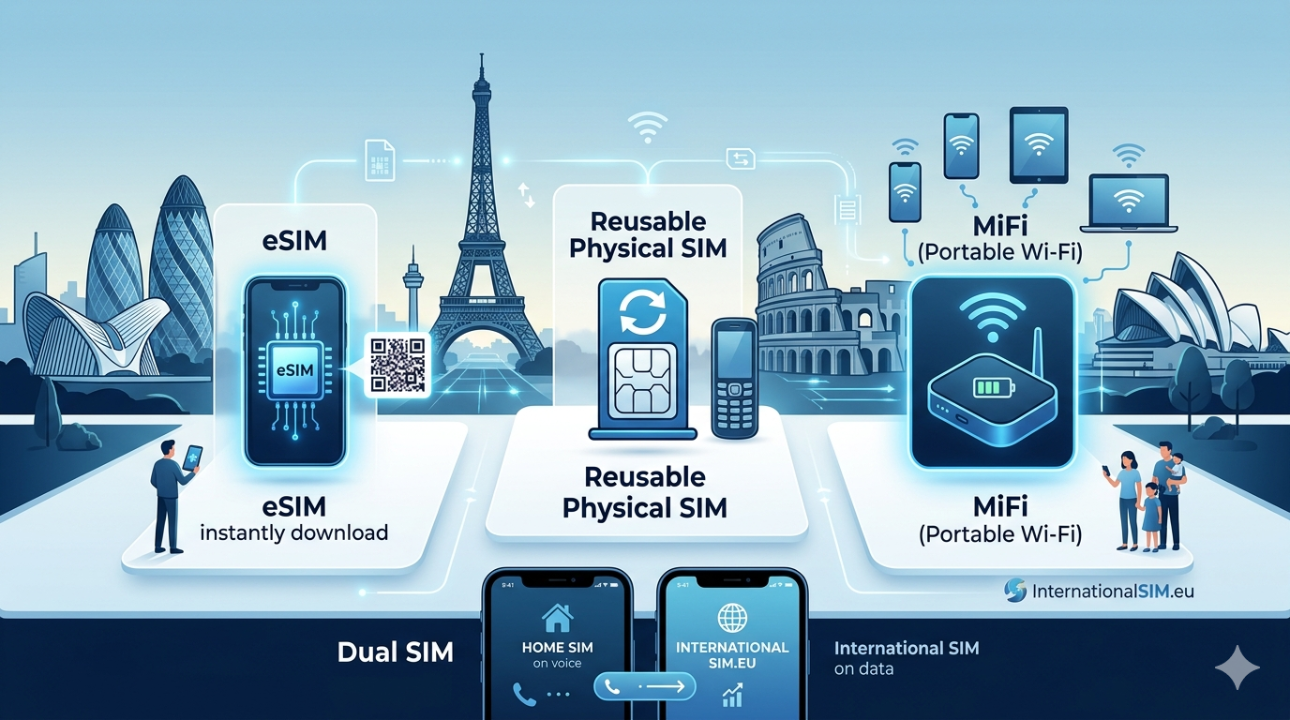
Between navigating unfamiliar streets, translating menus, and keeping in touch with family, having reliable mobile data is non-negotiable. Today, travelers have three main options for mobile connectivity in Europe: an eSIM, a physical local SIM card, or a portable MiFi device.
Each option has its strengths depending on how you travel, who you are traveling with, and what devices you own. Let's look at how they compare so you can choose the right fit for your journey.
1. eSIM (Embedded SIM)
An eSIM is a digital SIM card embedded directly into your smartphone hardware. Instead of swapping physical pieces of plastic, you download a digital profile over the air.
- Best For: Solo travelers, couples, or business travelers with newer, unlocked smartphones who want instant setup.
- How it Works: You buy a data bundle online before you leave, scan a QR code sent to your email, and activate the data line when you land.
- Pros:
- No physical shipping required; can be purchased and active within minutes.
- Keep your original physical SIM card in your phone to receive important security text codes from your bank back home (see the Dual SIM section below).
- Switch between data bundles digitally.
- Cons:
- Only works on newer, carrier-unlocked devices (generally iPhone XR or newer, and recent flagship Android devices).
2. Reusable Physical SIM Cards
If your phone doesn't support eSIM technology, a traditional physical plastic SIM card is your go-to alternative.
- Best For: Travelers with older phone models, carrier-locked devices that only allow physical swaps, or those who prefer a tangible setup.
- How it Works: You order the card before your trip, insert it into your phone's SIM tray upon arrival, configure your settings, and connect to local networks.
- Pros:
- Universally compatible with any unlocked phone that has a physical SIM slot.
- Highly reliable hardware solution.
- InternationalSIM cards are fully reusable; you keep the card and simply top up with a new mobile data bundle via our website for your next trip.
- Cons:
- Requires physical shipping time before you depart.
- If your phone only has a single SIM slot, you must remove your home country's SIM card, meaning you cannot receive calls or text messages on your primary number while using it.
3. MiFi Devices (Portable Hotspot)
A MiFi is a pocket-sized, battery-powered router that connects to cellular networks and broadcasts a private Wi-Fi signal to your surrounding devices.
- Best For: Families, small groups, remote workers, or anyone traveling with multiple devices like laptops, tablets, and e-readers.
- How it Works: Turn on the portable Roam-On MiFi device, find the Wi-Fi network name on your phone or laptop, enter the password, and share the data across all devices.
- Pros:
- Connect up to 5–10 devices simultaneously using just one data plan.
- Saves your smartphone's battery life since your phone connects via Wi-Fi rather than searching for distant cell towers.
- No configuration needed on your personal smartphones or tablets.
- Cons:
- It is an extra physical device that you must keep charged and carry with you during the day.
💡 The Power of Dual SIM: Keep Your Home Number Active
If your phone supports Dual SIM functionality, you get the best of both worlds. You can use an InternationalSIM product strictly for affordable mobile data while keeping your primary home SIM card active to receive important text messages, bank verification codes, and emergency calls.
Dual SIM works in two ways depending on your phone model:
- Physical SIM + eSIM (Digital Dual SIM): Most modern smartphones (such as iPhone XS and newer, or recent Samsung Galaxy flagships) feature one physical slot and an internal eSIM chip. You keep your home SIM in the tray and download our digital eSIM profile.
- Dual Physical SIM Slots: Some Android models and specific regional iPhones feature a tray that holds two physical nano-SIM cards at the same time. You place your home SIM in Slot 1 and the InternationalSIM card in Slot 2.
How to Configure a Dual SIM Phone for Travel:
To ensure your phone uses the correct network for data without accidental roaming charges from your home provider, adjust your device settings before landing:
- Set the Primary Data Line: In your phone’s network settings, select the InternationalSIM profile/slot as your primary line for Mobile Data (or Cellular Data).
- Set the Default Voice Line: Keep your home network SIM card selected for Default Voice Line (or Calls/SMS).
- Turn Data Roaming ON: Ensure Data Roaming is toggled ON specifically for the InternationalSIM profile. Leave data roaming turned off for your home network SIM to avoid unexpected fees.
At-A-Glance Comparison
| Feature | eSIM | Reusable Physical SIM | MiFi (Portable Wi-Fi) |
| Delivery Time | Instant (via email) | Requires shipping | Requires shipping |
| Device Swapping | None (Digital activation) | Must physically swap cards | None (Connects via Wi-Fi) |
| Multi-Device Use | Only via phone tethering | Only via phone tethering | Seamless for up to 10 devices |
| Battery Impact | Normal phone usage | Normal phone usage | Extends phone battery life |
| Phone Compatibility | Unlocked eSIM-capable phones | Any unlocked phone | Any Wi-Fi enabled device |
| Dual SIM Support | Yes (Keep home SIM active) | Yes (If phone has dual slots) | N/A (Connects via Wi-Fi) |
🛠️ Quick Setup Rules for InternationalSIM Data Bundles
All standard InternationalSIM cards and eSIMs are data-only. They do not include a phone number for traditional voice calls or outgoing SMS messages.
To ensure your data works seamlessly across European borders, always remember to turn Data Roaming ON in your device settings. If your network does not connect automatically, verify your Access Point Name (APN) matches your card profile type:
- 8988 Profiles: APN mobiledata
- 8931 Big Data Europe Profiles: APN fast.m2m
- 8949 O2 Profiles: APN pInternet.interkom.de
- Note: Always leave the username and password fields completely blank.
Special itinerary rule: China (eSIM Android and iOS, SIM Card iOS only).